
 François De Caro·23 November 2026·5 min read
AI tools now build a working prototype in a day. The value of a Design Sprint moves to framing, deciding and testing.
In 2026, a designer can describe a flow to an agent and get clickable screens before lunch. The prototyping day gets shorter, and the rest of the week carries more weight. Here is what changes, what stays the same, and how we adapt the format.
The classic sprint in a few lines
The Design Sprint created by Jake Knapp at Google runs over five days: map the problem on Monday, sketch solutions on Tuesday, pick the strongest on Wednesday, build a realistic prototype on Thursday and test it with five target customers on Friday (Design Sprint guide, Character).
The number five comes from usability research. Back in 2000, Jakob Nielsen showed that a test with five participants surfaces about 85% of usability problems (Nielsen Norman Group). For a decade, Thursday was the most stressful day: a team had eight hours to produce a believable facade.
What AI already changes
In January 2026, the studio thoughtbot described how it now runs sprints with Claude and Claude Code. Its teams build a working prototype in one day, with real screens and real interactions, and gather research, personas and flows in a single context space before generating anything (thoughtbot).
Design tools move the same way. Figma’s design agent, in open beta, can read other Figma files, connect to tools such as GitHub, Slack or Notion through MCP, and reuse instructions saved as skills shared with the team (Figma).
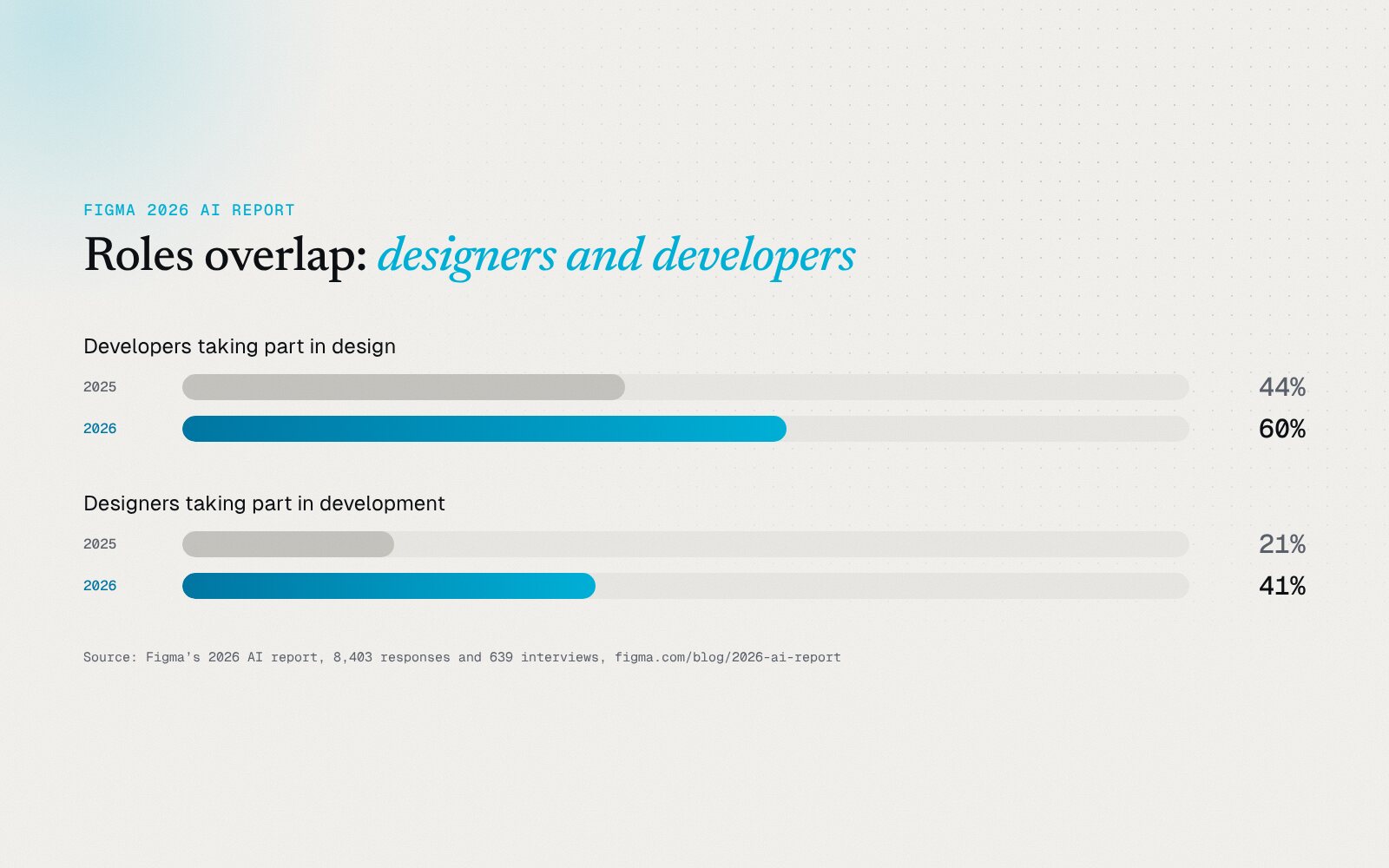
Roles are shifting too. According to Figma’s 2026 AI report, based on 8,403 responses and 639 interviews, the share of developers taking part in design rose from 44% to 60%, and the share of designers taking part in development from 21% to 41% (Figma).
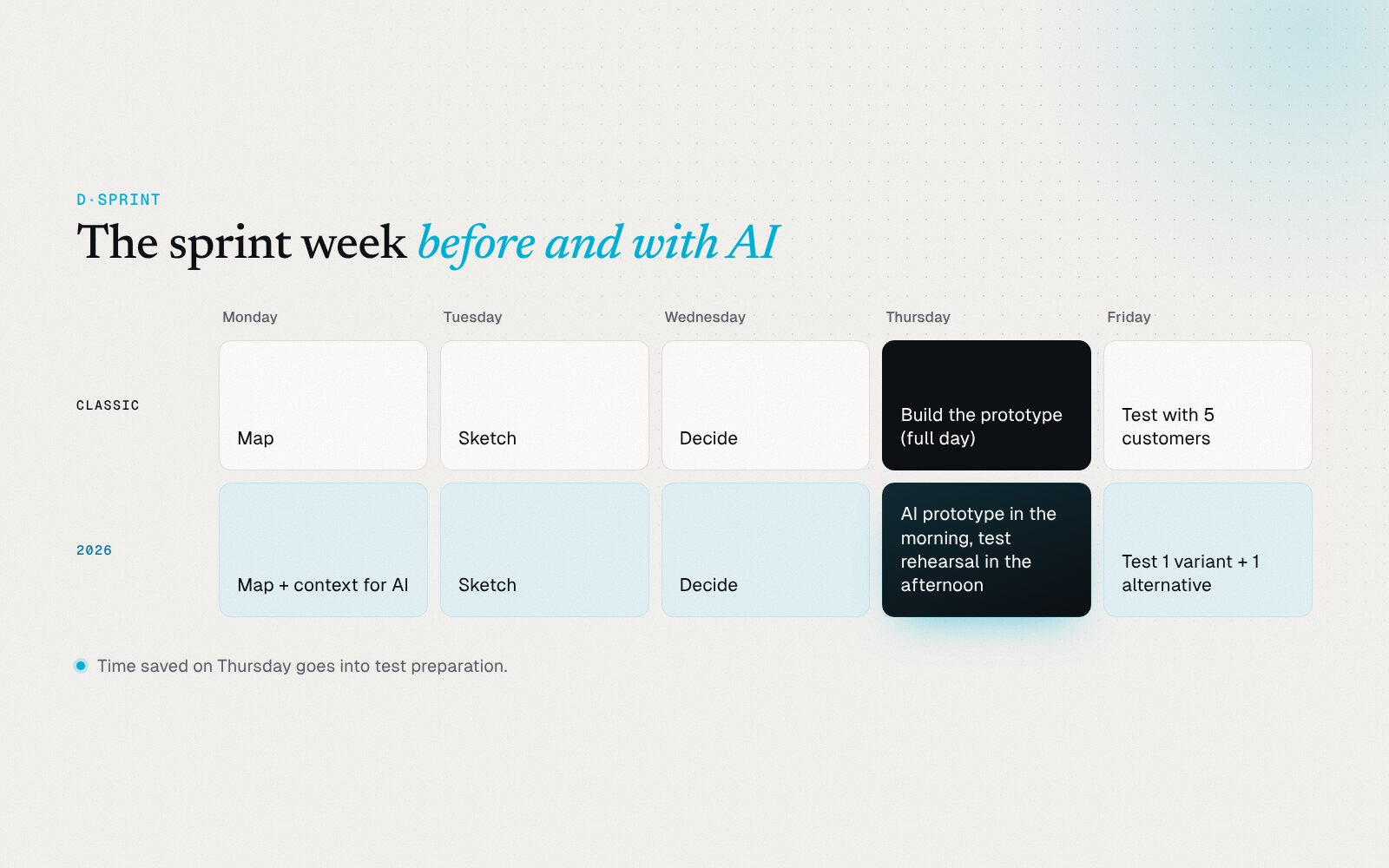
Example 1: a working prototype by Thursday noon
At thoughtbot, the founder of TellaDraft left with a prototype that had a real onboarding flow, a dashboard and a discovery interface, which she could test and show to investors. The team stresses two limits: a designer reviews every output, and the prototype stays disposable. It exists to learn, and it does not replace the final product.
For a sprint, the consequence is simple. Thursday afternoon frees up. A team can use it to rehearse the test, fix flow inconsistencies and write a solid interview script.
Example 2: testing two or three variants on Friday
When a variant costs one hour, the question changes: should a team still bet everything on a single solution? Harvard’s program on product development with AI describes a 48-hour sprint built on many micro-experiments, with a clear rule: AI explores, drafts and analyzes, humans decide, verify and make the call (Harvard DCE).
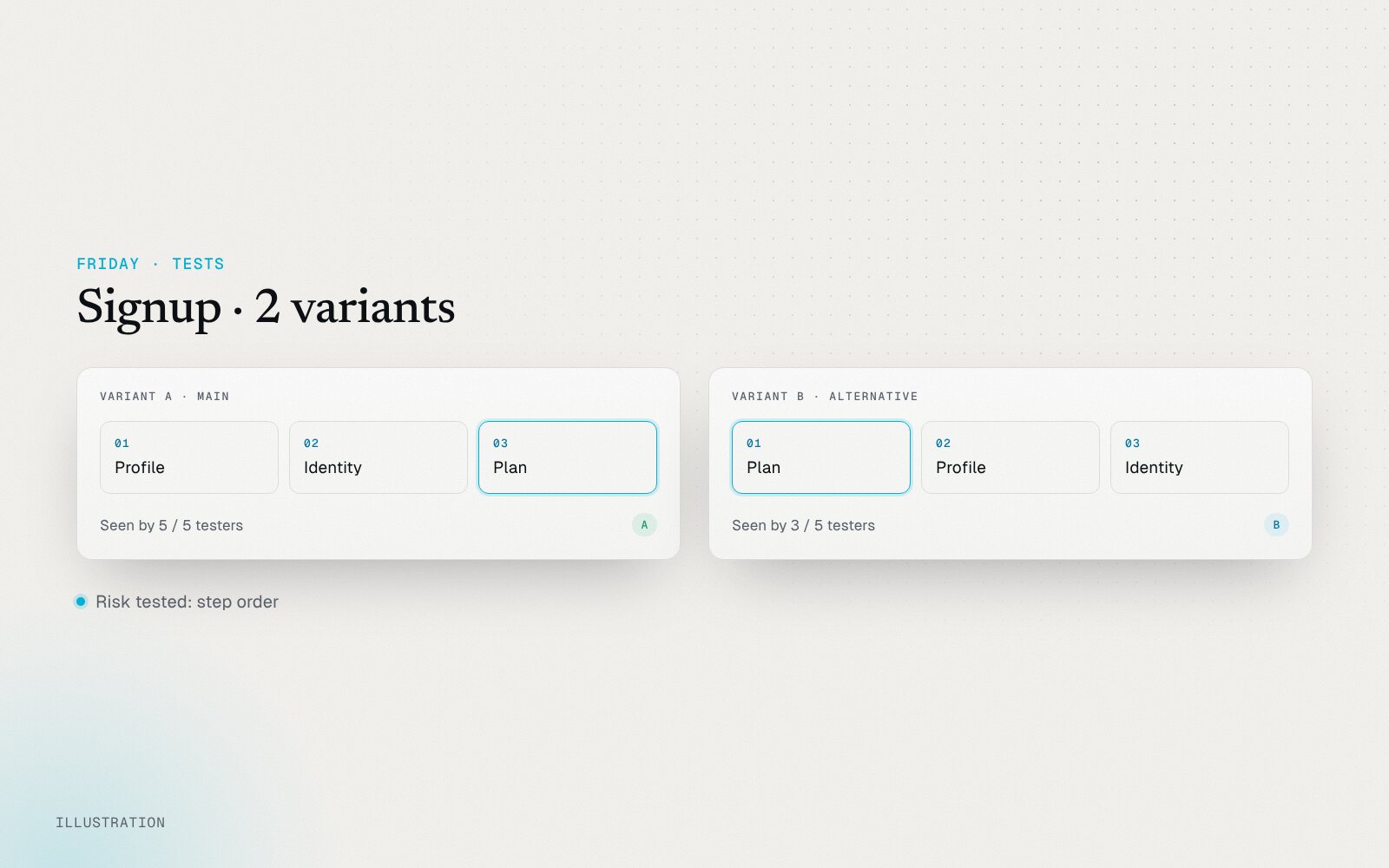
Our recommendation: keep Wednesday’s decision, then prepare one main variant and one or two alternatives aimed at the riskiest point. On Friday, every participant sees the main variant, and the alternative resolves one specific doubt, such as the order of signup steps or how fees are displayed.
Example 3: the design system as fuel for AI
An agent produces better screens when it knows your components, tokens and rules. thoughtbot calls it context-first prompting, and it is also the promise of Figma’s skills and MCP connections. A team that arrives at the sprint with a documented design system wins twice: the prototype looks like the product, and the tests focus on usage instead of style.
Figma’s figures show that the line between design and code is fading. For a sprint, this means inviting a developer from Monday and preparing the context before the week: brand, components, technical constraints.
Preparing an AI-assisted sprint: the checklist
An AI-assisted sprint needs earlier preparation than a classic one, because the tool needs context to produce something useful. These are the five points we check before Monday.
- A written sprint question. One sentence that says what the team must learn by the end of the week. It guides the prompts as much as the discussions.
- A context folder. Existing research, personas, current flows, key figures, customer quotes. thoughtbot gathers these in a shared project before generating a single screen.
- The product building blocks. Components, tokens, accessibility and tone rules. Without them, the prototype looks like a generic product and testers react to the style.
- A design and development pair. The developer knows what the prototype can simulate and what must not be promised to testers.
- Tester recruitment. Five people with the right profile, booked before the sprint starts. The prototype takes a few hours, the right participants take several days.
One last safeguard: a designer reviews every generated screen before the test. A broken icon or a vague label is enough to skew an interview.
What does not change
- The problem is framed together. Harvard warns against letting AI define the problem or evaluate itself without oversight.
- The decision belongs to a decider. A fast prototype does not say which direction deserves to be built.
- Real users remain the proof. Five well-run interviews are worth more than a perfect prototype nobody tested.
- A sprint is not always the right tool. If the problem is already validated or the organization will not act on the results, choose another format.
What we take away at D-SPRINT
Our approach: keep the first three days as they are: understand, sketch, decide. They create a team’s alignment, and no tool does it for them. Then compress prototype building to half a day with AI and reinvest the time saved in test preparation, one alternative variant and a richer readout.
Our advice to product teams: prepare the context before the sprint (design system, current flows, customer data), name a decider, and keep Friday sacred. To see how we run the week, visit our Design Sprint workshop page or our article on effective user testing.
Sources
- Design Sprint guide, Character (Jake Knapp, John Zeratsky)
- Why You Only Need to Test with 5 Users, Jakob Nielsen, Nielsen Norman Group, March 2000
- Rapid prototyping with Claude Code, thoughtbot, January 2026
- The AI Product Sprint: a 48-hour playbook, Harvard DCE, April 2026
- Figma’s 2026 AI report, Figma, 2026
- Figma’s design agent, now with custom tools and greater context, Figma, 2026
Written by
François De Caro
UX designer and Design Sprint facilitator, founder of D-SPRINT. Paris and Milan.